
Turn Music Conversations into Playlists Instantly
Overview
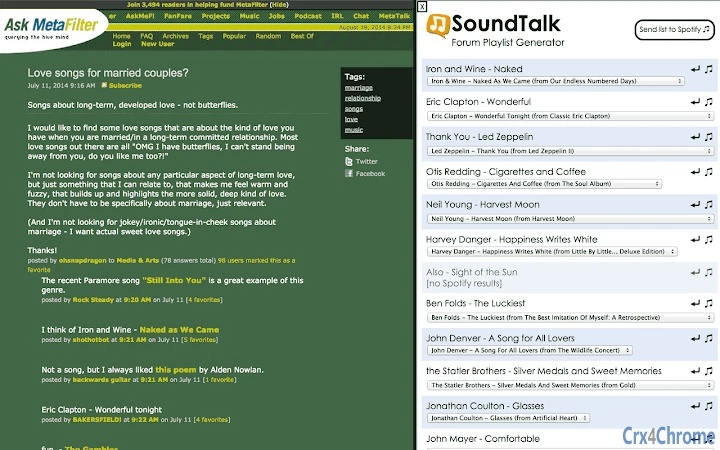
SoundTalk is a desktop-compatible browser extension designed to transform music-related conversations on web pages into playable Spotify playlists. Its primary function is to scan text content for patterns resembling artist-song pairings—such as "Artist - Song" or "Song by Artist"—and extract them for immediate playback. This tool addresses the common challenge of discovering music from informal online discussions, such as forum threads, blog posts, or social media comments, where users casually mention songs they enjoy. It is especially useful for music enthusiasts, researchers, and content creators who want to quickly access and explore songs referenced in digital conversations.
Target users include individuals who frequently engage with music communities on platforms like Reddit or Ask MetaFilter, where song recommendations are often embedded in natural language. The software operates within a browser environment, making it accessible without requiring dedicated desktop software installation beyond the extension. While the developer is identified as the SoundTalk Team, no further organizational details are available. Real-world usage scenarios include scanning a music recommendation thread on a subreddit or reviewing a blog post about a concert review to instantly generate a playlist of mentioned tracks.
Key Features & Capabilities
- Automatic Song Detection: Scans web pages for text patterns matching artist-song formats, including variations like "Artist - Song", "Song by Artist", and quoted titles such as "Song", Artist.
- Smart Recognition Engine: Uses contextual analysis to identify likely music references, even when phrasing is non-standard or informal.
- Manual Correction Interface: Allows users to double-click detected song entries to fix misidentifications and select correct matches from a dropdown menu.
- Spotify Integration: Sends finalized playlists directly to a user’s Spotify account with a single click, enabling seamless playback.
- Multi-Platform Compatibility: Works across Windows, Mac, and Linux operating systems through supported browsers.
For example, when browsing a Reddit thread discussing classic rock, SoundTalk can detect entries like "The Rolling Stones - (I Can't Get No) Satisfaction" and prompt the user to send the track to Spotify. In another scenario, a blog post listing favorite songs from a decade can be processed to generate a curated playlist. The tool does not claim 100% accuracy—some ambiguous text may be misclassified—but it significantly reduces the time required to manually search for songs mentioned in online discussions.
User Interface, Workflow & Performance
The user interface is minimal and integrated directly into the browser toolbar, ensuring low visual clutter. The main action is initiated by clicking a single button, which triggers a scan of the current page. Detected songs appear in a compact overlay, with each entry showing the original text and a suggested match. Users can interact with each item by double-clicking to edit or selecting from a dropdown list of possible matches, improving accuracy.
Workflow efficiency is high for users familiar with online music communities. The process from page load to playlist delivery typically takes under 30 seconds, depending on the number of detected tracks. The extension does not require significant system resources, as it operates in the browser context and performs lightweight text analysis.
However, the developer did not specify resource usage details, including CPU or RAM behavior during operation. Stability appears consistent with standard browser extensions, though no formal performance benchmarks were provided. Overall, the interface prioritizes speed and simplicity, making it accessible to both casual users and power users alike.
Compatibility & System Requirements
SoundTalk is compatible with Windows, Mac, and Linux operating systems. It functions as a browser extension, meaning it requires a supported web browser to operate. The installation size is 5.2 MB, which is typical for lightweight browser tools. The software version is 1.2.3, released on July 15, 2024.
Exact system requirements were not listed. Compatibility information is limited to the operating systems mentioned. No specific hardware specifications, such as processor speed or memory, were provided. Users should ensure their browser supports extensions and is up to date. The developer did not specify whether additional plugins or services (e.g., Spotify account) are required beyond the standard setup.
Pros and Cons
Pros
- Effortlessly converts music references in web content into playable playlists
- Intuitive interface with minimal user input required
- Direct integration with Spotify for instant playback
- Lightweight at only 5.2 MB in size
- Available for Windows, Mac, and Linux users
Cons
- Accuracy depends on text formatting; ambiguous phrasing may lead to errors
- Does not work offline; requires an active internet connection
- Relies on external services (Spotify) for playback
- Limited to browser-based environments
- No built-in feedback mechanism for incorrect detections
FAQ Section
Is SoundTalk available for all major browsers?
SoundTalk is compatible with browsers that support extensions on Windows, Mac, and Linux. Specific browser support details were not provided by the developer.
Does SoundTalk require a Spotify account?
Yes, a Spotify account is required to receive and play the generated playlists. SoundTalk sends playlists directly to the user’s linked Spotify account.
Can I use SoundTalk without an internet connection?
No, the tool requires an active internet connection to scan web pages and communicate with Spotify.
How often does SoundTalk receive updates?
Version 1.2.3 was released on July 15, 2024. The developer did not specify a regular update schedule.
Is SoundTalk free to use?
Yes, SoundTalk is available at no cost. The software is offered as a free tool for users who want to discover music from online conversations.
Final Thoughts + CTA
SoundTalk delivers a focused and effective solution for music discovery within digital conversations. Its ability to parse informal text and convert it into playable Spotify playlists makes it a valuable asset for anyone immersed in music communities. While not perfect—some detections may require manual correction—the tool significantly reduces friction between hearing about a song and listening to it.
The lightweight design, cross-platform availability, and seamless Spotify integration enhance its appeal. For music lovers, bloggers, and researchers, this tool offers a unique workflow advantage. If you frequently read about music online, SoundTalk can turn passive reading into active listening.
Download SoundTalk now







